
Hands-on Guide to Multi-Agent Project Evaluation with Praison AI
Evaluating complex projects, such as hackathon submissions or technical demos, poses a lot of challenges due to the multifaceted nature of innovation, technical depth, user experience, and market potential. Where traditional evaluation methods rely on human judges, which can introduce bias, subjectivity, inconsistency issues. In this article, we explore a different approach which uses multi-agent AI systems that integrates video analysis, audio transcription, and specialized evaluation agents to deliver a structured, objective and comprehensive project assessment.
Table of Content
- Introduction
- Architecture Overview
- Key Features
- Practical Use Cases
- Technical Deep Dive
Introduction
Evaluating project demos and presentations can be tricky as there's a lot to consider, from technical complexity and innovation to user experience and market potential. What if we tell you could make this process faster, more objective, and even a bit smarter? In this guide, we’ll walk you through a multi-agent AI system that analyzes project videos, transcribes audio explanations and then scores each submission across multiple dimensions. By the end, you’ll be able to build an AI that can help you generate consistent evaluations, actionable insights, and professional reports making project assessment more efficient, transparent, and insightful than ever before.
Architecture Overview
Video & Audio Extraction
The first step in our evaluation pipeline is to extract meaningful content from project videos. Key frames are captured to highlight important visual moments, while the audio is transcribed into text for analysis. This dual extraction ensures that both visual and spoken content are available for the AI agents, allowing a comprehensive understanding of the project’s presentation and technical details.
Multi-Agent Evaluation
Once the content is extracted, specialized AI agents evaluate different aspects of the project. Each agent focuses on a specific dimension, technical complexity, design and user experience, or market potential allowing for expert-level analysis across multiple facets. By dividing responsibilities, the system can provide more accurate and nuanced feedback than a single evaluator could achieve.
Tech Agent
The Tech Agent is responsible for scoring the project’s technical complexity and identifying key innovations. It analyzes the algorithm design, and problem-solving approach. By highlighting strengths and potential weaknesses, this agent ensures that technical merit is thoroughly evaluated, helping judges or stakeholders understand the depth, feasibility, and originality of the project’s implementation.
Design Agent
The Design Agent evaluates the project’s user experience, presentation quality, and overall completeness. It examines how effectively the interface communicates functionality, whether the flow is intuitive, and how visually engaging the presentation is. By providing feedback on usability and aesthetics, the agent ensures that projects are not only technically sound but also accessible, polished, and impactful for end users.
Market Agent
The Market Agent assesses scalability, business relevance, and market potential. It evaluates how well the project could fit into a real-world context, identifying opportunities for adoption or commercialization. By considering factors like target audience, growth potential, and industry trends, this agent provides insights that go beyond technical performance, helping teams understand the broader implications of their solution.
Aggregator Agent
The Aggregator Agent merges the outputs of all individual evaluators into a unified, structured evaluation. It standardizes scores, compiles qualitative feedback, and generates an output that captures strengths, weaknesses, technical highlights, and recommendations. This ensures a consistent, reproducible assessment that combines insights from multiple perspectives into a single, actionable evaluation for stakeholders or judges.
Report & Visualization
Finally, the system generates interactive reports and visualizations. PDF summaries, CSV datasets, radar charts, and bar charts present the project’s evaluation in a clear, digestible format. By combining textual feedback with visual analytics, this step allows stakeholders to quickly grasp overall performance, compare submissions, and make informed decisions, transforming raw AI evaluations into professional, presentation-ready insights.
Key Features
- Weighted Scoring: Evaluations are calculated using customizable weights, balancing technical complexity, innovation, UX, and completeness.
- Frame-Based Visual Analysis: Scene-based frame extraction ensures critical visual moments are assessed.
- Audio Transcription & Analysis: Whisper-based transcription enables the system to understand and evaluate spoken explanations.
- Automated Reporting: Generates professional PDF reports with scores, visualizations, and strengths/weaknesses.
- Interactive Visualization: Charts highlight evaluation breakdowns, aiding rapid insight for stakeholders.
Practical Use Cases
Hackathon Evaluation
Quickly evaluate multiple hackathon submissions with consistent, unbiased scoring of technical, design, and market aspects.
Technical Demos & POCs
Assess demos and POCs efficiently, analyzing innovation, feasibility, and technical depth for actionable improvement insights.
Academic Project Assessment
Support faculty in grading complex projects with objective metrics.
Investor Pitches
Provide structured insights on technical feasibility and market readiness.
Step By Step Guide
Step 1: Install Dependencies
!pip install praisonaiagents[llm] opencv-python moviepy pywhisper reportlab matplotlib pandas plotly openai-whisper
Installs all required Python libraries for AI agents, video/audio processing, reporting, and visualization.
Step 2: Import Libraries
import os
import cv2
import re
import json
import numpy as np
import pandas as pd
import matplotlib.pyplot as plt
import plotly.graph_objects as go
from typing import List, Dict
from pydantic import BaseModel, Field
from praisonaiagents import Agent, Task, PraisonAIAgents
from moviepy.editor import VideoFileClip
from IPython.display import display, Image
import whisper
from reportlab.platypus import SimpleDocTemplate, Paragraph, Spacer, Image as RLImage, Table
from reportlab.lib.styles import getSampleStyleSheet
Imports all necessary modules for video processing, AI agents, data handling, and report generation.
Step 3: Configure Evaluation Settings
CONFIG = {
    "num_frames": 5,          # how many frames to extract
    "keep_frames": False,     # delete extracted frames after evaluation
    "export_pdf": True,       # generate PDF report or not
    "output_dir": "/content/project_eval",
    "weights": {
        "innovation": 0.2,
        "technical_complexity": 0.25,
        "user_experience": 0.2,
        "presentation_quality": 0.2,
        "completeness": 0.15
    }
}

# Make sure directory exists

os.makedirs(CONFIG["output_dir"], exist_ok=True)
Sets up parameters like number of frames, output paths, scoring weights, and ensures output directory exists.
Step 4: Define Evaluation Data Model
class ProjectEvaluation(BaseModel):
    innovation_score: int = Field(..., ge=0, le=100)
    technical_complexity: int = Field(..., ge=0, le=100)
    presentation_quality: int = Field(..., ge=0, le=100)
    user_experience: int = Field(..., ge=0, le=100)
    completeness: int = Field(..., ge=0, le=100)
    overall_score: float
    key_strengths: List[str]
    areas_for_improvement: List[str]
    technical_highlights: List[str]
    recommendations: List[str]
    market_potential: str
    scalability_assessment: str
Defines the structured schema for storing evaluation scores, feedback, and insights.
Step 5: Extract Key Video Frames
def extract_frames_scene_based(video_path: str, num_frames: int = 5) -> List[str]:
    import cv2, os
    frames_dir = os.path.join(CONFIG["output_dir"], "frames")
    os.makedirs(frames_dir, exist_ok=True)
    cap = cv2.VideoCapture(video_path)
    total_frames = int(cap.get(cv2.CAP_PROP_FRAME_COUNT))
    interval = max(total_frames // (num_frames + 1), 1)
    frame_paths = []

    for i in range(1, num_frames + 1):
        cap.set(cv2.CAP_PROP_POS_FRAMES, i * interval)
        ret, frame = cap.read()
        if not ret:
            break
        frame_path = os.path.join(frames_dir, f"frame_{i}.jpg")
        cv2.imwrite(frame_path, frame)
        frame_paths.append(frame_path)
    cap.release()
    return frame_paths
Captures evenly spaced video frames for visual analysis.
Step 6: Transcribe Audio from Video
def extract_audio_transcript(video_path: str) -> str:
    clip = VideoFileClip(video_path)
    audio_path = video_path.replace(".mp4", ".wav")
    clip.audio.write_audiofile(audio_path)
    model = whisper.load_model("base")
    result = model.transcribe(audio_path)
    return result["text"]
Converts spoken content in the video into text for AI analysis.
Step 7: Initialize AI Agents
from IPython.display import display, Markdown
os.environ["GEMINI_API_KEY"] = ""

tech_agent = Agent(name="TechEvaluator", role="Tech Expert", goal="Evaluate technical complexity", llm="gemini/gemini-2.0-flash")

design_agent = Agent(name="DesignEvaluator", role="UX Designer", goal="Evaluate presentation & UX", llm="gemini/gemini-2.0-flash")

market_agent = Agent(name="MarketAnalyst", role="Business Analyst", goal="Evaluate scalability & market potential", llm="gemini/gemini-2.0-flash")

aggregator = Agent(name="Aggregator", role="Lead Judge", goal="Merge scores & finalize evaluation", llm="gemini/gemini-2.0-flash")
Creates specialized agents to evaluate technical, design, market, and aggregate results.
Step 8: Define Project Evaluation Function
def evaluate_project(video_path: str) -> ProjectEvaluation:

    # === Frame & Audio Extraction ===
    frames = extract_frames_scene_based(video_path, CONFIG["num_frames"])
    transcript = extract_audio_transcript(video_path)

    # === Tasks for Agents ===
    tasks = [
        Task(
            name="tech_eval",
            description=f"Evaluate the *technical complexity* of this project.\nTranscript:\n{transcript}",
            agent=tech_agent,
            images=frames
        ),

        Task(
            name="design_eval",
            description=f"Evaluate the *user experience & presentation quality*.\nTranscript:\n{transcript}",
            agent=design_agent,
            images=frames
        ),

        Task(
            name="market_eval",
            description=f"Evaluate the *market potential & scalability*.\nTranscript:\n{transcript}",
            agent=market_agent
        ),

        Task(
            name="aggregate_eval",
            description="""

Merge the previous evaluations into a single JSON following this schema:

{
  "innovation_score": int (0-10),
  "technical_complexity": int (0-10),
  "presentation_quality": int (0-10),
  "user_experience": int (0-10),
  "completeness": int (0-10),
  "overall_score": float,
  "key_strengths": [str],
  "areas_for_improvement": [str],
  "technical_highlights": [str],
  "recommendations": [str],
  "market_potential": str,
  "scalability_assessment": str
}

""",
            agent=aggregator,
            output_pydantic=ProjectEvaluation
        )
    ]

    # === Run Agents ===
    agents = PraisonAIAgents(
        agents=[tech_agent, design_agent, market_agent, aggregator],
        tasks=tasks,
        process="sequential",
        verbose=True
    )

    response = agents.start()

    # === Parse Final Aggregator Output ===

    output = None
    if isinstance(response, dict) and "task_results" in response:
        final_task = response["task_results"][-1]
        if hasattr(final_task, "pydantic") and final_task.pydantic:
            output = final_task.pydantic

        elif hasattr(final_task, "raw") and final_task.raw:
            try:
                raw = final_task.raw.strip()
                output = ProjectEvaluation(**json.loads(raw))

            except Exception as e:
                raise ValueError(f"Could not parse aggregator raw output: {e}")

    elif isinstance(response, str):
        try:
            output = ProjectEvaluation(**json.loads(response))

        except Exception as e:
            raise ValueError(f"Aggregator returned invalid JSON string: {e}")

    else:
        raise ValueError(f"Unexpected response type from agents: {type(response)}")

    # === Weighted Overall Score ===

    weighted = sum([
        output.innovation_score * CONFIG['weights']['innovation'],
        output.technical_complexity * CONFIG['weights']['technical_complexity'],
        output.user_experience * CONFIG['weights']['user_experience'],
        output.presentation_quality * CONFIG['weights']['presentation_quality'],
        output.completeness * CONFIG['weights']['completeness']
    ])

    output.overall_score = round(weighted, 2)

    # After evaluation + Markdown display

    if CONFIG["export_pdf"]:
        pdf_path = generate_pdf_report(output, frames)
        print(f"📄 PDF report saved at: {pdf_path}")

    # === Cleanup Frames ===

    if not CONFIG["keep_frames"]:
        for f in frames:
            try: os.remove(f)
            except: pass

        try:
            os.rmdir(os.path.join(os.path.dirname(video_path), "frames"))
        except: pass

    # === Markdown Report ===

    report_md = f"""

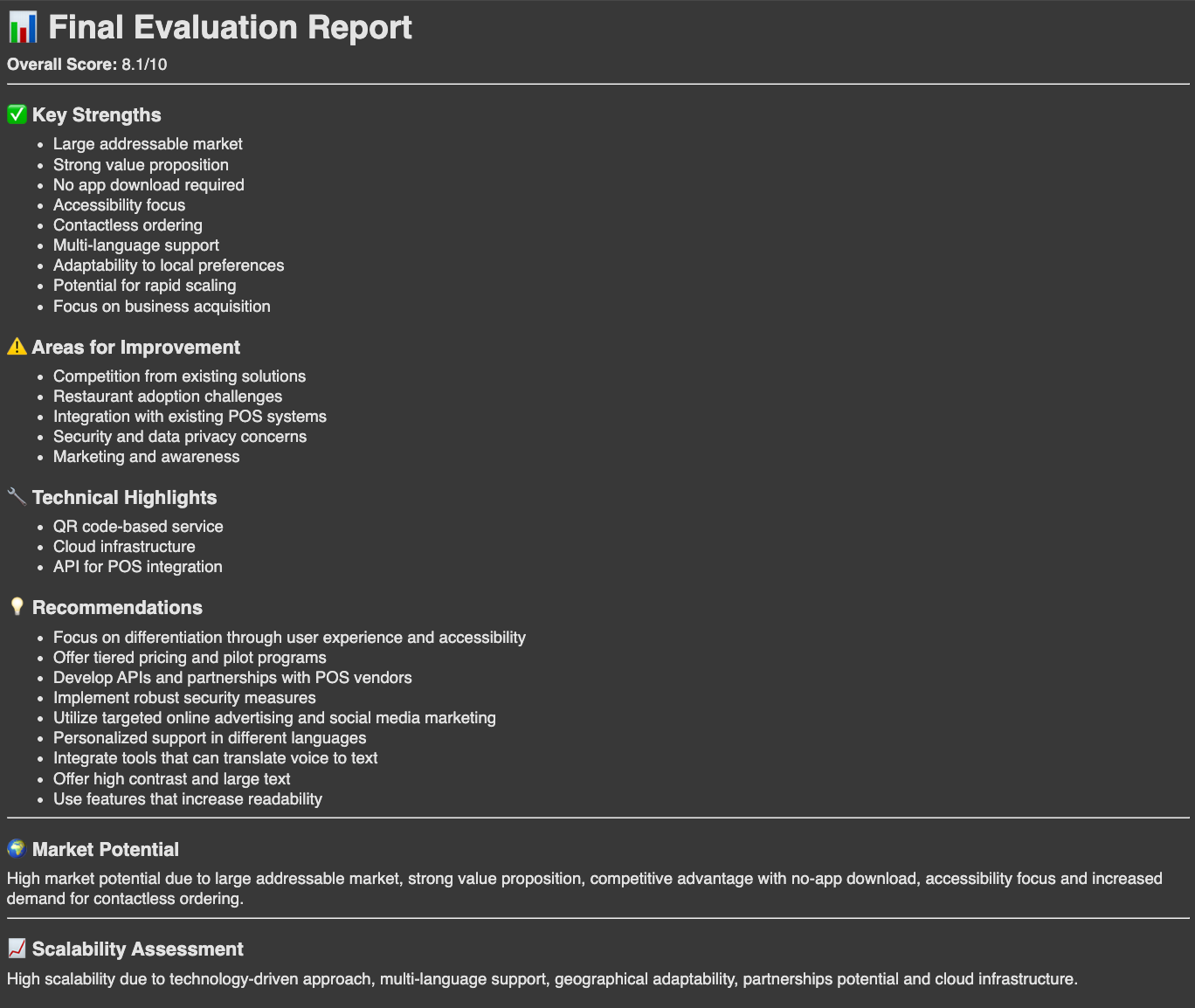
# 📊 Final Evaluation Report

**Overall Score:** {output.overall_score}/10
---
### ✅ Key Strengths
- {"\n- ".join(output.key_strengths)}

### ⚠️ Areas for Improvement
- {"\n- ".join(output.areas_for_improvement)}
### 🔧 Technical Highlights
- {"\n- ".join(output.technical_highlights)}
### 💡 Recommendations
- {"\n- ".join(output.recommendations)}
---
### 🌍 Market Potential
{output.market_potential}
---
### 📈 Scalability Assessment
{output.scalability_assessment}

"""
    display(Markdown(report_md))

    return output  # JSON-compatible object
Runs all AI agents sequentially on extracted frames and transcript, returning structured evaluation results.
Step 9: Save Results to JSON & CSV
from reportlab.platypus import SimpleDocTemplate, Paragraph, Spacer, Image as RLImage, Table
from reportlab.lib.styles import getSampleStyleSheet
from reportlab.lib.pagesizes import A4

def save_results(project_name: str, result: ProjectEvaluation):
    json_path = os.path.join(CONFIG["output_dir"], f"{project_name}.json")
    csv_path = os.path.join(CONFIG["output_dir"], f"results.csv")
    with open(json_path, "w") as f:
        json.dump(result.dict(), f, indent=2)
    df = pd.DataFrame([result.dict()])
    if os.path.exists(csv_path):
        df.to_csv(csv_path, mode="a", header=False, index=False)

    else:
        df.to_csv(csv_path, index=False)
    return json_path, csv_path
Stores evaluation data in both JSON and CSV formats for record-keeping.
Step 10: Generate PDF Report
def generate_pdf_report(evaluation: ProjectEvaluation, frame_paths: List[str], output_path="/content/evaluation_report.pdf"):

    doc = SimpleDocTemplate(output_path, pagesize=A4)
    styles = getSampleStyleSheet()
    elements = []
    elements.append(Paragraph("📊 Hackathon Project Evaluation Report", styles['Title']))
    elements.append(Spacer(1, 12))
    elements.append(Paragraph(f"Overall Score: {evaluation.overall_score}/10", styles['Heading2']))
    elements.append(Spacer(1, 12))
    # Category Scores Table

    data = [
        ["Innovation", evaluation.innovation_score],
        ["Technical Complexity", evaluation.technical_complexity],
        ["Presentation Quality", evaluation.presentation_quality],
        ["User Experience", evaluation.user_experience],
        ["Completeness", evaluation.completeness]
    ]

    table = Table(data, hAlign="LEFT")
    elements.append(table)
    elements.append(Spacer(1, 20))

    # Sections
    def add_section(title, items):
        elements.append(Paragraph(title, styles['Heading2']))
        if isinstance(items, list):
            for i in items:
                elements.append(Paragraph(f"- {i}", styles['Normal']))
        else:
            elements.append(Paragraph(items, styles['Normal']))
        elements.append(Spacer(1, 12))

    add_section("✅ Key Strengths", evaluation.key_strengths)
    add_section("⚠️ Areas for Improvement", evaluation.areas_for_improvement)
    add_section("🔧 Technical Highlights", evaluation.technical_highlights)
    add_section("💡 Recommendations", evaluation.recommendations)
    add_section("🌍 Market Potential", evaluation.market_potential)
    add_section("📈 Scalability Assessment", evaluation.scalability_assessment)

    # Add Frames (Screenshots)
    elements.append(Paragraph("🎞️ Extracted Frames", styles['Heading2']))

    for frame in frame_paths:
        try:
            elements.append(RLImage(frame, width=250, height=150))
            elements.append(Spacer(1, 12))

        except:
            pass
    doc.build(elements)
    return output_path
Creates a professional PDF report including scores, feedback, and extracted frames.
Step 11: Visualize Results
def visualize_results(result: ProjectEvaluation):
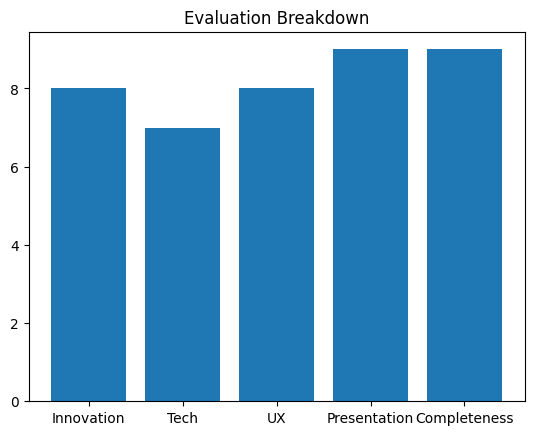
    categories = ["Innovation", "Tech", "UX", "Presentation", "Completeness"]
    scores = [result.innovation_score, result.technical_complexity, result.user_experience, result.presentation_quality, result.completeness]

    # Radar chart
    fig = go.Figure(data=go.Scatterpolar(r=scores, theta=categories, fill='toself'))
    fig.update_layout(title="Project Evaluation Radar Chart", polar=dict(radialaxis=dict(visible=True, range=[0,100])))
    fig.show()

    # Bar chart
    plt.bar(categories, scores)
    plt.title("Evaluation Breakdown")
    plt.show()
Displays radar and bar charts for a quick visual understanding of project scores.
Step 12: Run Full Evaluation
video_file = "/content/presentation.mp4"

try:
    result = evaluate_project(video_file)
    json_path, csv_path = save_results("project1", result)
    visualize_results(result)
    print(f"Results saved: {json_path}, {csv_path}")

except Exception as e:
    print(f"❌ Error: {e}")
Executes the complete evaluation pipeline on a video, saves results, and shows visualizations.
Output
As you can see, The project scores highly in presentation quality and completeness, with strong performance in innovation and UX, while technical complexity is slightly behind the other areas.
Result
Final Thoughts
The integration of AI-driven multi-agent evaluation systems offers an objective, scalable, and reproducible approach to project assessment. By combining video analysis, audio transcription, and specialized evaluators, organizations can standardize evaluation metrics, improve transparency, and accelerate decision-making. Whether for hackathons, academic projects, or investor pitches, this system provides a powerful blueprint for modern project assessment.