A Hands-on Guide to PaliGemma 2 Vision Language Model
PaliGemma 2, which builds on the success of PaliGemma, is the second generation of Vision-Language Models (VLMs). This model family offers state of the art capabilities in a variety of fields, including OCR, molecular recognition, radiography report production, and more. Its design makes it adaptable with excellent performance, and it covers several sizes and resolutions. Making PaliGemma 2 a strong tool for both research and commercial applications because it combines sophisticated visual encoders with the potent Gemma 2 language model, which excels in transfer learning.
Table of Content
- What is PaliGemma 2?
- Key Features and Innovations
- PaliGemma 2’s Architecture Overview
- Hands-On Implementation
- Real-World Applications
What is PaliGemma 2?
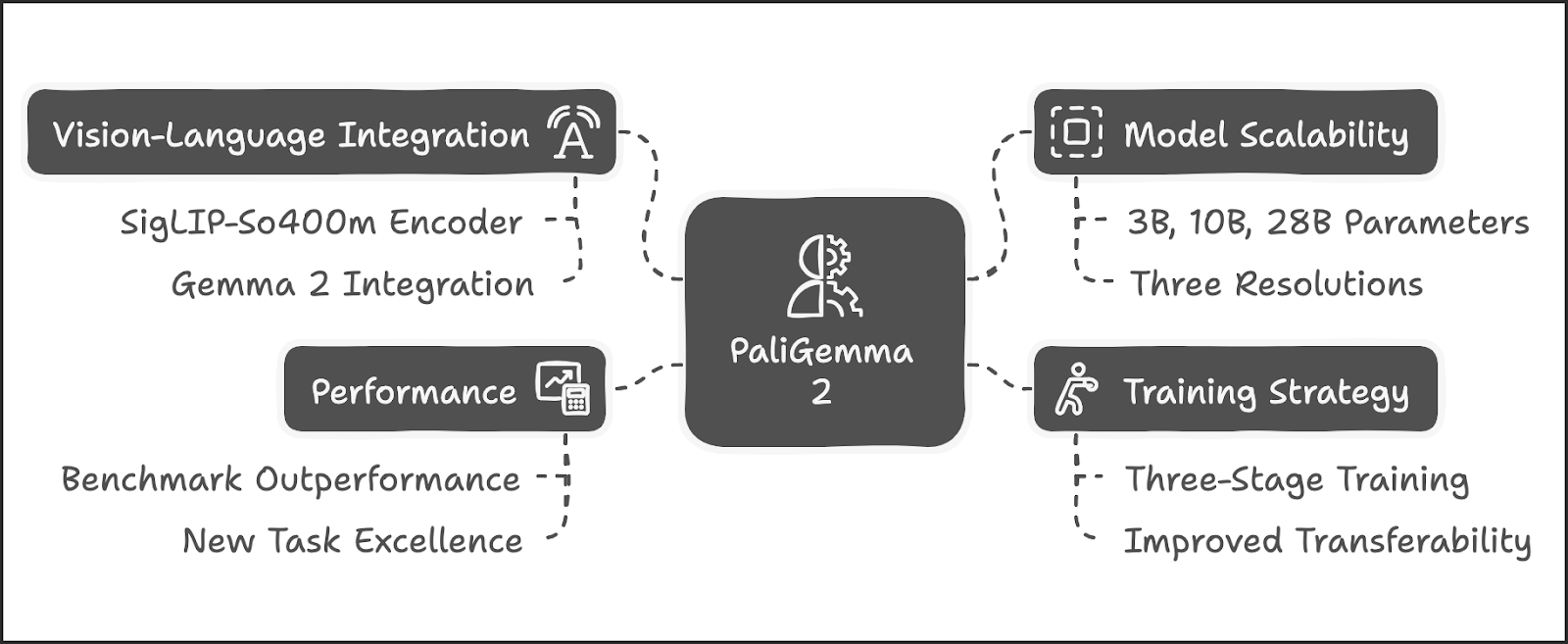
PaliGemma 2 is an upgraded open-source Vision-Language Model that integrates the SigLIP-So400m vision encoder with the advanced Gemma 2 language models, available in three sizes: 3B, 10B, and 28B parameters. Trained at resolutions of 224px², 448px², and 896px², it employs a three-stage training process to equip the models with broad knowledge for fine-tuning across diverse tasks. These models achieve state-of-the-art results in several domains, setting a new benchmark in multimodal learning.
Key Features and Innovations
Advanced Vision-Language Integration
PaliGemma 2 combines the SigLIP-So400m vision encoder with Gemma 2, which enables it to have robust image and text token processing. It autoregressively completes input prompts, allowing nuanced multimodal interaction.
Scalable Model Sizes and Resolutions
PaliGemma 2 has models having 3B, 10B, and 28B parameters and three resolutions, PaliGemma 2 allows users to tailor computational requirements to specific tasks.
Enhanced Training Recipe
PaliGemma 2 uses a three-stage training strategy, which improves transferability. Tasks such as OCR and captioning benefit from increased resolution and model size, which enhance detail capture and semantic understanding.
State-of-the-Art Performance
It outperforms its predecessor across over 30 benchmarks and excels in new tasks like molecular structure recognition, optical music score transcription, and spatial reasoning.
Key Features of PaliGemma 2
PaliGemma 2’s Architecture Overview
Vision Encoder
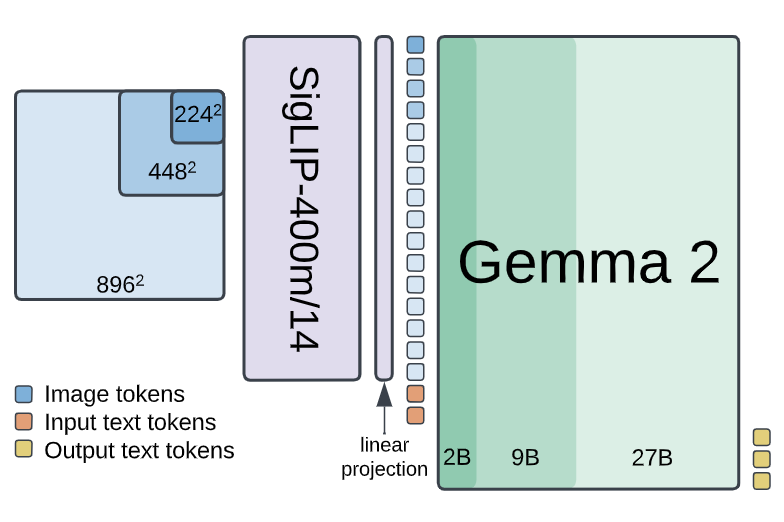
PaliGemma 2’s SigLIP-So400m encoder processes images at varying resolutions, producing tokens that are then linearly projected into the Gemma 2 input space. This architecture ensures compatibility across various model sizes and resolutions.
PaliGemma 2's Architecture
Language Model
Gemma 2, with 2B, 9B, and 27B variants, processes concatenated image and text tokens. allowing autoregressive predictions, ideal for tasks which require detailed understanding and generation.
Hands-On Implementation
Step 1: Set Up Kaggle Credentials
Import the required os module and Colab's userdata API for managing environment variables.After that Set the Kaggle username and key as environment variables. We need to authorize access to paligemma 2 on kaggle first before using.
import os
from google.colab import userdata

os.environ["KAGGLE_USERNAME"] = userdata.get("KAGGLE_USERNAME")
os.environ["KAGGLE_KEY"] = userdata.get("KAGGLE_KEY")
Step 2: Install Required Libraries
!pip install -q -U keras keras-hubStep 3: Configure Backend and Memory Settings
Set the Keras backend to JAX and configure memory allocation for optimal performance.
os.environ["KERAS_BACKEND"] = "jax"
os.environ["XLA_PYTHON_CLIENT_MEM_FRACTION"] = "1.00"
Step 4: Import Necessary Libraries
Import essential modules such as numpy, PIL.Image, and keras_hub for image processing and model inference.
import keras_hub
import keras
import numpy as np
from PIL import Image
from keras.utils import img_to_array
import requests
Step 5: Load an Input Image
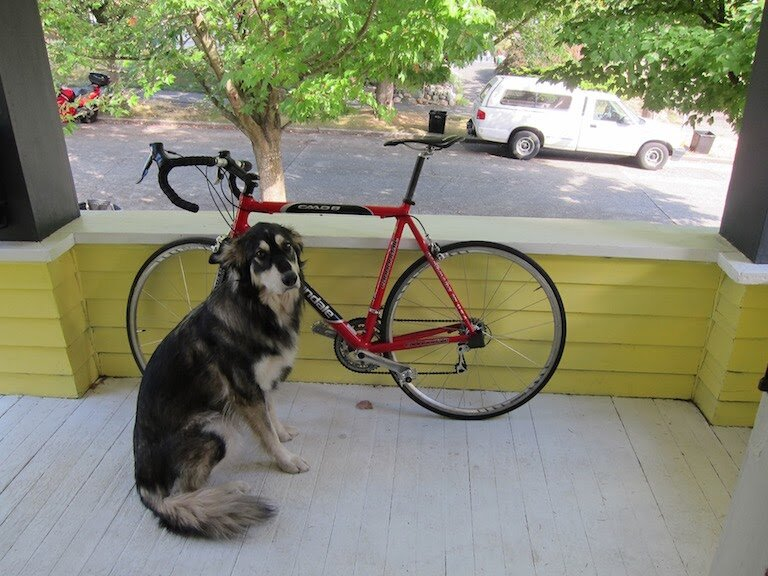
Load an image from a URL and display it using IPython.
img_url = "https://images.squarespace-cdn.com/content/v1/5eea681ba10cc5139559fcca/1620310177042-JUJSTFZ6C2FEGN4JDS8F/dog.jpeg?format=2500w"

input_image = Image.open(requests.get(img_url, stream=True).raw)
from IPython.display import display

display(input_image)
Output
Step 6: Define Helper Functions
Implement helper functions to process and visualize results:
draw_bounding_box: Draws bounding boxes and labels on the image.
draw_results: Parses model output and applies bounding boxes to the input image.
import cv2

import re

def draw_bounding_box(image, coordinates, label, label_colors, width, height):
    y1, x1, y2, x2 = coordinates
    y1, x1, y2, x2 = map(round, (y1*height, x1*width, y2*height, x2*width))
    text_size, _ = cv2.getTextSize(label, cv2.FONT_HERSHEY_SIMPLEX, 1, 3)
    text_width, text_height = text_size
    text_x = x1 + 2
    text_y = y1 - 5
    font_scale = 1
    label_rect_width = text_width + 8
    label_rect_height = int(text_height * font_scale)
    color = label_colors.get(label, None)
    if color is None:
        color = np.random.randint(0, 256, (3,)).tolist()
        label_colors[label] = color
    cv2.rectangle(image, (x1, y1 - label_rect_height), (x1 + label_rect_width, y1), color, -1)
    thickness = 2

    cv2.putText(image, label, (text_x, text_y), cv2.FONT_HERSHEY_SIMPLEX, font_scale, (255, 255, 255), thickness, cv2.LINE_AA)

    cv2.rectangle(image, (x1, y1), (x2, y2), color, 2)

    return image
def draw_results(paligemma_response):
detections = paligemma_response.split(" ; ")
parsed_coordinates = []
labels = []
label_colors = {}
output_image = input_image
output_img = np.array(input_image)
if len(detections) > 1:
for item in detections:
detection = item.replace("<loc", "").split()
if len(detection) >= 2:
coordinates_str = detection[0]
coordinates = coordinates_str.split(">")
coordinates = coordinates[:4]
if coordinates[-1] == '':
coordinates = coordinates[:-1]
coordinates = [int(coord)/1024 for coord in coordinates]
parsed_coordinates.append(coordinates)
for label in detection[1:]:
if "<seg" in label:
continue
else:
labels.append(label)
else:
# No label detected, skip the iteration.
continue
width = input_image.size[0]
height = input_image.size[1]
# Draw bounding boxes on the frame.
image = cv2.cvtColor(np.array(input_image), cv2.COLOR_RGB2BGR)
for coordinates, label in zip(parsed_coordinates, labels):
output_img = draw_bounding_box(output_img, coordinates, label, label_colors, width, height)
output_image = Image.fromarray(output_img)
elif len(detections) == 1:
for item in detections:
detection = item.split("<loc")
if len(detection) >= 5:
coordinates = []
for value in detection[1:5]:
coordinates.append(value.split(">")[0])
if coordinates[-1] == '':
coordinates = coordinates[:-1]
coordinates = [int(coord)/1024 for coord in coordinates]
parsed_coordinates.append(coordinates)
labels.append("object")
else:
# No label detected, skip the iteration.
continue
width = input_image.size[0]
height = input_image.size[1]
# Draw bounding boxes on the frame.
image = cv2.cvtColor(np.array(input_image), cv2.COLOR_RGB2BGR)
for coordinates, label in zip(parsed_coordinates, labels):
output_img = draw_bounding_box(output_img, coordinates, label, label_colors, width, height)
output_image = Image.fromarray(output_img)
return output_imageStep 7: Load and Configure the Model
Load the PaliGemmaCausalLM model from Kaggle.Then Resize the input image to match the model’s expected dimensions.
model_name = "kaggle://keras/paligemma2/keras/pali_gemma_2_ft_docci_3b_448"
target_size_x = int(model_name[model_name.rfind("_") + 1 :])
target_size = (target_size_x, target_size_x)
pali_gemma_lm = keras_hub.models.PaliGemmaCausalLM.from_preset(model_name)
pali_gemma_lm.summary()
Step 8: Perform Inference
Image Captioning:
Use the model to generate a caption for the image. Then Visualize the results using draw_results.
input_text = "<image>caption en\n"

result = pali_gemma_lm.generate(
    inputs={
        "images": img_to_array(input_image.resize(target_size)),
        "prompts": input_text,
    }
)

print(result)
draw_results(result[len(input_text):])
Output
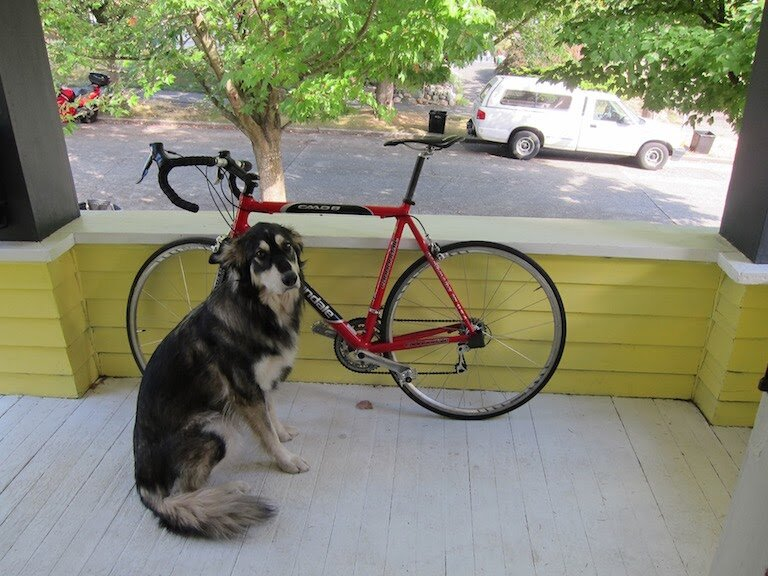
A medium-close-up view of a black and white dog that is sitting on a white wooden floor. The dog is looking at a red road bike that is leaning against the yellow wooden wall. The bike has white rims and a black seat. The word "cannondale" is written in white letters on the side of the bike. The bike is placed on a front porch. Behind the dog, there is a white van that is parked on the side of the road. On the other side of the road, there is a tree that is filled with green leaves.Object Detection:
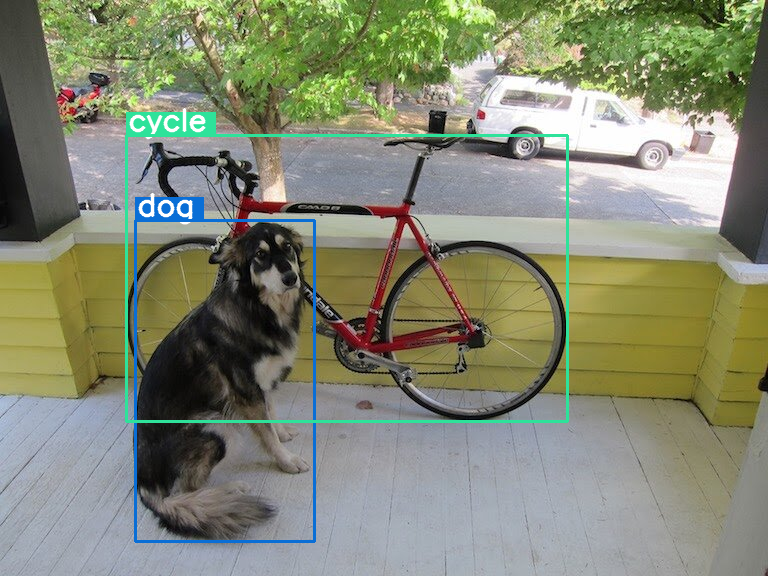
Use the model to detect objects (e.g., "dog" and "cycle") in the image. Then Visualize the results with bounding boxes.
input_text = "detect  dog ; cycle\n"

result = pali_gemma_lm.generate(
    inputs={
        "images": img_to_array(input_image.resize(target_size)),
        "prompts": input_text,
    }
)

print(result)
draw_results(result[len(input_text):])
Output
Real-World Applications
Optical Character Recognition (OCR)
PaliGemma 2 performs better text detection and recognition than other models, achieving state-of-the-art F1 scores on benchmarks like ICDAR’15 and Total-Text.
Molecular Structure Recognition
High-resolution images can be used by the model to accurately identify molecular structures, outperforming specialized systems like MolScribe.
Radiography Report Generation
In the medical domain, It generates detailed, accurate radiography reports, achieving leading RadGraph F1 scores on the MIMIC-CXR dataset.
Long Caption Generation
Fine-tuned on datasets like DOCCI, It produces factually accurate and detailed image captions, setting a new standard in descriptive generation.
Final Words
The future of open-source multimodal AI is best represented by PaliGemma 2. It raises the benchmark for vision-language models by fusing cutting-edge architectural breakthroughs, scalable training techniques, and remarkable transfer performance. PaliGemma 2 provides unmatched adaptability and efficacy for both industrial deployment and academic research. Its open-weight models let users investigate new AI boundaries for both creative and scientific purposes.