Self-Organising File Management Through LlamaFS

Traditional file managers typically rely on manual file categorisation based on folders, tags, etc. It can be time-consuming and inefficient, especially for users managing a large number of files. LlamaFS is a self-organising file manager built using Llama 3 LLM that automates the process of managing files by intelligently sorting and organising them based on their content. It uses Llama 3 LLM powered with Groq's inference API to perform AI-driven analysis and organise them.
LlamaFS can significantly reduce the time and effort required to manage files. This article explores the implementation and working of LlamaFS.
Table of Content
- Understanding LlamaFS and its Utility
- LlamaFS Modes of Operation
- Running LlamaFS using FastAPI
Understanding LlamaFS and its Utility
LlamaFS is a self-organising file manager that uses Llama 3 at the backend to automate file categorisation, renaming and sorting based on the file content and file-based conventions. It uses an AI-driven approach to understand the file nature and implement a flexible adjustment in file organisation.
LlamaFS analyses the files and uses its built-in AI-driven intelligence to categorise and rename them. This can save significant time and effort compared to manual file organisation. The process involves content analysis and retrieving context for appropriate file organisation.
The LlamaFS project is completely open-source and the code is freely available for anyone to inspect, contribute or modify on https://github.com/iyaja/llama-fs. It is a good option for users who need the effortless organisation of files based on content-aware sorting, i.e., similarly documents, photos or even code snippets can be grouped enabling faster accessibility.
LlamaFS is built on Python, based on Llama 3 LLM and inference using Groq’s API for file content summarisation and structuring. Ollama can be implemented for local processing. It uses a cross-platform open-source framework named Electron, as a frontend for a user-friendly UI.
LlamaFS Modes of Operations
LlamaFS can be executed in two primary modes - Batch Mode and Watch Mode, and a toggle-based Stealth (incognito) Mode.
Batch Mode
This mode allows a user to target specific folders or groups of files for organisation by LlamaFS. The user can select a directory and initiate a sorting process, enabling it to analyse and categorise the files present in the directory.
Watch Mode
LlamaFS can be implemented using watch mode where it passively monitors the file system in the background, performing automatic analysis and relevant categorisation. It doesn't need any manual intervention to operate. This mode involves execution of a background service (daemon process) which intercepts file system operations to proactively learn and organise based on context and recent file edits.
Stealth Mode
LlamaFS can operate in stealth mode, enabling file processing without cloud uploads. This feature maintains user data privacy and prevents data leakage.
Running LlamaFS using FastAPI
To install and execute the LlamaFS project, we need to follow the steps listed below:
Step 1 - Use the git clone command to create a copy of the target repository:
git clone https://github.com/iyaja/llama-fs.gitStep 2 - Change the directory to llama-fs:
cd llama-fs Step 3 - Install the required Python packages using the requirements.txt file:
pip install -r requirements.txt| Package Name | Utility |
| ollama | A platform for running LLMs locally |
| chromadb | Open-source embedding database |
| llama-index | Data framework for LLM application building and Orchestration |
| litellm | Unified interface to call LLMs using consistent I/O Formats |
| groq | Groq Python library provides convenient access to Groq REST API |
| docx2txt | Python-based utility for text and image extraction from docx files |
| colorama | Implement coloured terminal text and cursor positioning |
| termcolor | ANSI colour formatting for output in the terminal |
| click | Command Line Interface Creation Kit for writing CLIs |
| asciitree | ASCII tree generator for folder structure and documentation |
| fastapi | Web framework for building APIs with Python |
| weave | Toolkit for developing GenAI applications |
| agentops | Python SDK for AI agent evaluation and observability |
| langchain | Building LLM applications |
| langchain_core | Base abstractions that power the LangChain ecosystem |
| watchdog | Python API and shell utilities for monitoring file system events |
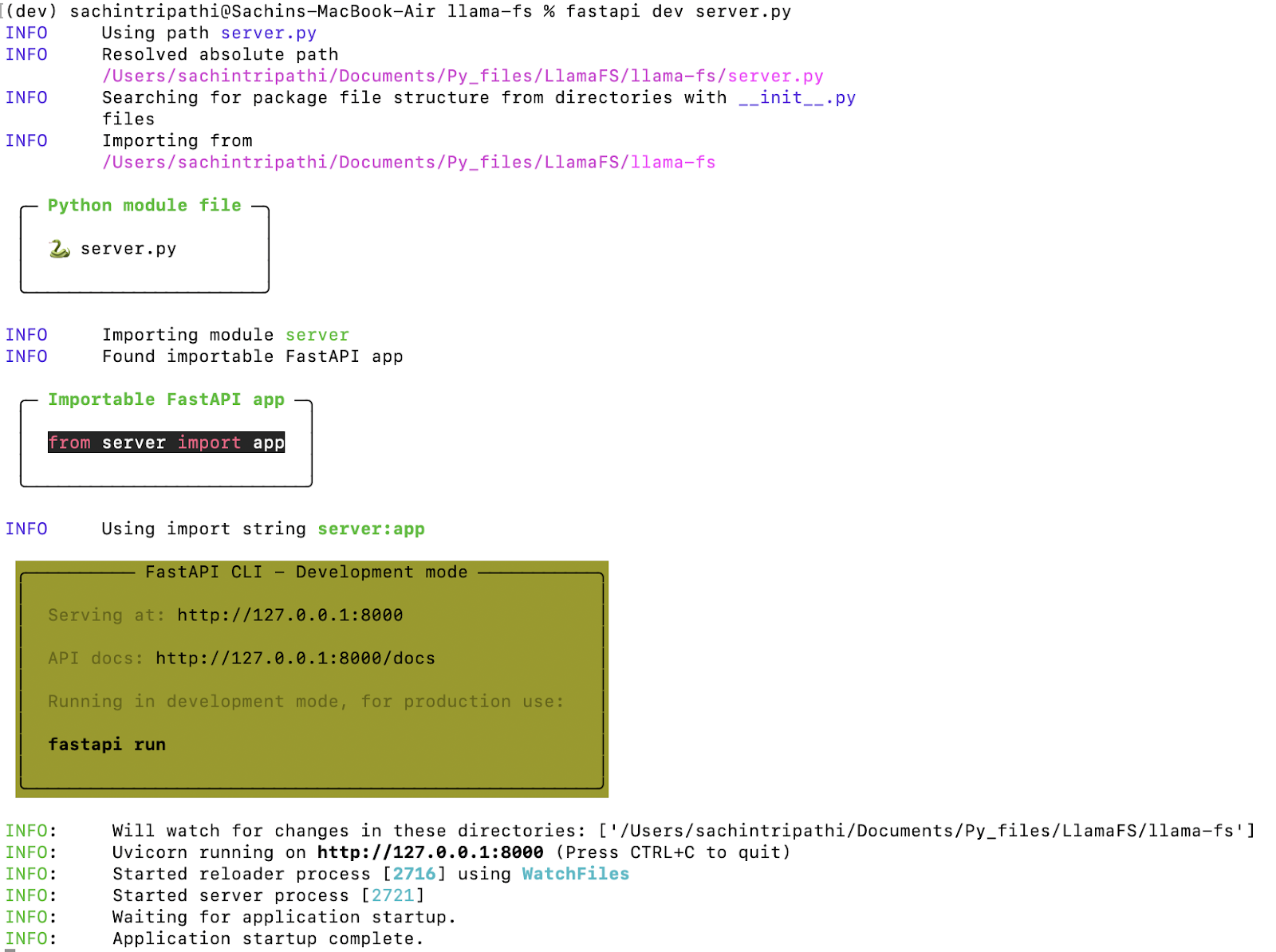
Step 4 - Update server.py and main.py files with a valid Groq API, use FastAPI to serve the application and query using the CURL command -
fastapi dev server.pyOutput
curl -X POST http://127.0.0.1:8000 \
-H "Content-Type: application/json" \
 -d '{"path": "/Users/sachintripathi/Downloads/demo101", "instruction": "string", "incognito": false}'
Make sure to use your folder path where you wish LlamaFS to understand and organise the structure
Output
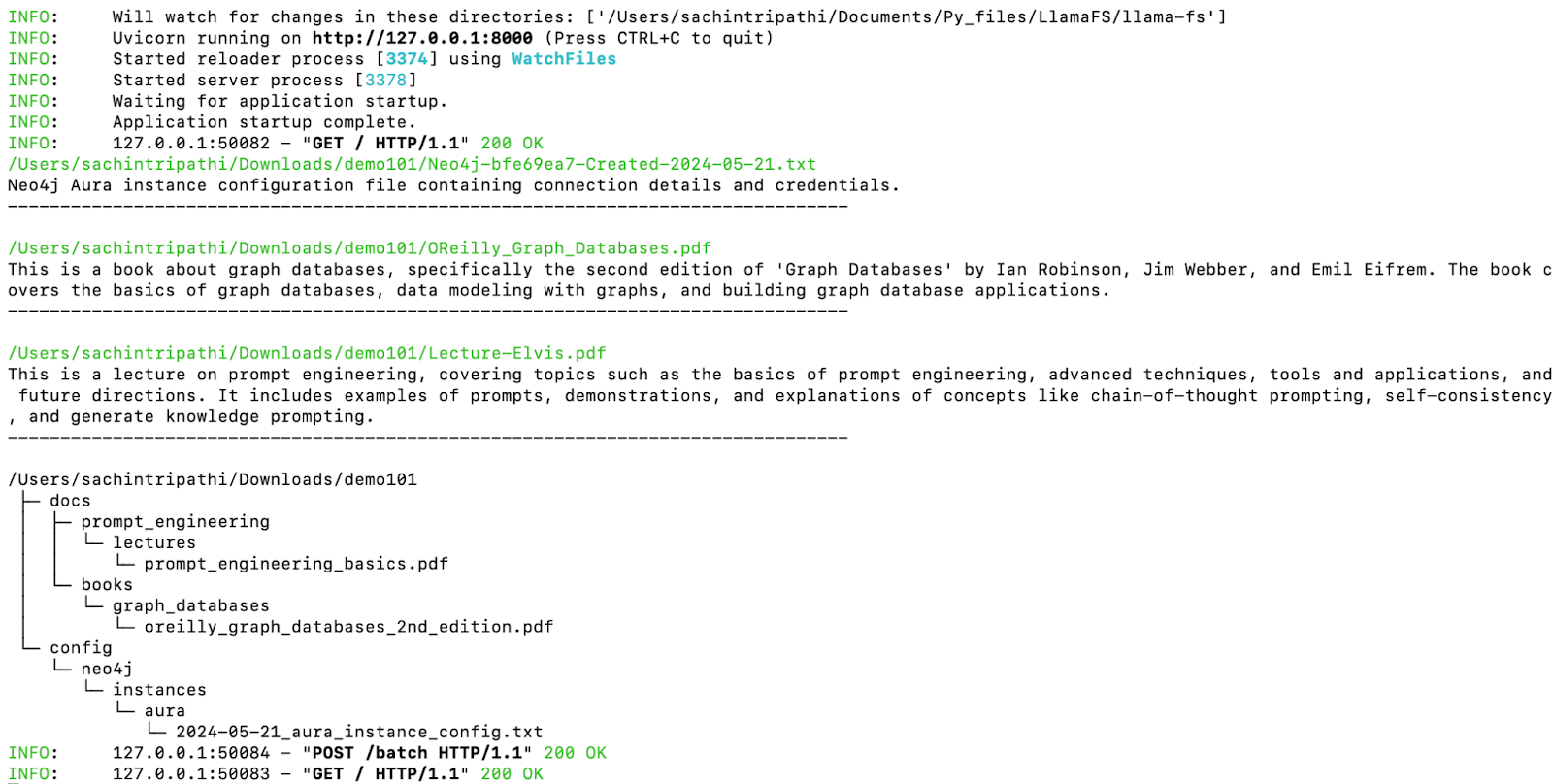
LlamaFS understood the files and gave a description based on their context, this is used in categorising and organising the file structure. Users can check the output of LlamaFS’s suggested file structures and finalise changes if needed.
Final Words
LlamaFS offers an intelligent and privacy-focused file management approach, potentially saving time and effort in keeping the user’s digital space organised and appropriately categorised. LlamaFS is extremely fast and immediately usable. By integrating local processing with Ollama, implementing smart caching, and using Groq’s API, it offers a seamless experience.
References
Learn more about generative AI and LLM concepts through our hand-picked modules:
Sachin Tripathi
Sachin Tripathi is the Manager of AI Research at AIM, with over a decade of experience in AI and Machine Learning. An expert in generative AI and large language models (LLMs), Sachin excels in education, delivering effective training programs. His expertise also includes programming, big data analytics, and cybersecurity. Known for simplifying complex concepts, Sachin is a leading figure in AI education and professional development.